이번에 프로젝트를 진행하면서 기존에 사용하던 코드를 유지 보수하는 시간을 가졌습니다.
기존 코드의 문제점
간단한 예시로 기존 코드의 문제점을 확인해보겠습니다.
    @GetMapping("/seats")
    public ResponseEntity<?> librarySeats() {

        List<LibrarySeatResponse> unavailableSeats = librarySeatService.getUnavailableLibrarySeat()
                .stream()
                .map(LibrarySeatResponse::from)
                .toList();

        return ResponseEntity.ok().body(ApiUtils.success(unavailableSeats));
    }
해당 Controller의 반환 타입은 ResponseEntity<?> 이며
반환 값은 다음과 같습니다. ResponseEntity.ok().body(ApiUtils.success(unavailableSeats));
기존에는 아래와 같이 ApiUtils class를 만들어 success와 error method를 통해 클라이언트 개발자에게 데이터를 전달할 수 있었습니다.
public class ApiUtils {
    public static <T> ApiResult<T> success(T response) {
        return new ApiResult<>(true, response, null);
    }

    public static ApiResult<?> error(String message, HttpStatus status) {
        return new ApiResult<>(false, null, new ApiError(message, status.value()));
    }

    public record ApiResult<T>(boolean success, T response, ApiError error) {
    }

    public record ApiError(String message, int status) {
    }
}
해당 코드를 유지 보수해야겠다고 생각한 이유는 제네릭 와일드카드 때문입니다.
제네릭 와일드카드에 대해 모르시는 분들은 아래의 포스팅을 보고 오시는 것을 추천드립니다.
제네릭 와일드카드는 적절하게 사용될 때 코드의 유연성을 크게 향상시킬 수 있습니다. 하지만 잘못 사용되었을 때는 코드의 복잡성을 증가시키고, 유지보수를 어렵게 만들 수 있습니다. 기존 코드가 잘못 되었다고는 말할 수 없지만 ResponseEntity 만으로 클라이언트에게 충분히 데이터를 전달할 수 있겠다고 생각했습니다.
ResponseEntity Class 내부 뜯어보기
전체 코드가 650줄 정도라 다 가져오기엔 다소 무리가 있기 때문에 먼저 큰 틀을 편집해서 가져왔습니다.
public class ResponseEntity<T> extends HttpEntity<T> {

    private final HttpStatusCode status;

    /*
      오버라이딩된 여러 생성자들과
      status 및 body 등 관련 method들
      **DefaultBuilder를 반환해서 변환 후 클라이언트에게 데이터 전송**
     */

    public interface HeadersBuilder<B extends HeadersBuilder<B>> {

        /*
          Header 관련 추상 메소드
        */
    }

    public interface BodyBuilder extends HeadersBuilder<BodyBuilder> {

        /*
          Body 관련 추상 메소드
        */
    }

    private static class DefaultBuilder implements BodyBuilder {

        private final HttpStatusCode statusCode;

        private final HttpHeaders headers = new HttpHeaders();

        /*
          생성자와 오버라이딩 메소드
        */
    }
}
HeadersBuilder<B extends HeadersBuilder<B>> 에서 제네릭 타입 B에 관해 짚고 넘어가겠습니다.
B 는 현재 정의되고 있는 인터페이스 자체를 확장하는 제네릭 타입입니다. 이 타입은 해당 인터페이스를 구현하는 클래스가 제네릭 타입 B 를 반환하도록 하는 용도로 사용됩니다.
즉, HeadersBuilder 인터페이스를 구현하는 클래스는 제네릭 타입 B를 정의하고, 해당 클래스에서는 B ****타입의 객체를 반환하도록 해야 합니다. 이렇게 함으로써 해당 클래스를 상속받는 하위 클래스에서는 반환 타입이 제네릭 타입 B인 것을 보장할 수 있습니다. 이렇게 함으로써 해당 클래스의 사용자는 메서드 체이닝(chaining)을 통해 계속해서 같은 유형의 객체를 반환받을 수 있게 됩니다. 같은 유형의 객체를 반환받을 수 있기 때문에 빌더 패턴에서 많이 사용됩니다.
예를 들어 위의 코드에선 BodyBuilder interface를 상속 받은 DefaultBuilder의 대부분의 메서드들은 BodyBuilder 객체를 반환하도록 정의되어 있습니다.
그렇다면 ResponseEntity<T> 에서 제네릭 타입 T 은 무엇일까요?
T 는 타입(type)를 의미하며, 클래스나 메서드를 정의할 때 실제 타입으로 대체될 것을 나타냅니다.
제네릭 클래스나 메서드를 정의할 때, 해당 클래스나 메서드가 사용될 때 실제로 사용될 타입을 유연하게 지정할 수 있도록 하는 데 사용됩니다. 뒤에서 T 타입의 사용에 대해 더 설명하겠습니다.
ResponseEntity 는 ok, created method 등을 통해 DefaultBuilder 객체를 반환합니다.
/**
	 * Create a builder with the given status.
	 * @param status the response status
	 * @return the created builder
	 * @since 4.1
	 */
public static BodyBuilder status(HttpStatusCode status) {
		Assert.notNull(status, "HttpStatusCode must not be null");
		return new DefaultBuilder(status);
	}
---
/**
	 * A shortcut for creating a {@code ResponseEntity} with the given body
	 * and the status set to {@linkplain HttpStatus#OK OK}.
	 * @param body the body of the response entity (possibly empty)
	 * @return the created {@code ResponseEntity}
	 * @since 4.1
	 */
	public static <T> ResponseEntity<T> ok(@Nullable T body) {
		return ok().body(body);
	}
---
/**
	 * Create a new builder with a {@linkplain HttpStatus#CREATED CREATED} status
	 * and a location header set to the given URI.
	 * @param location the location URI
	 * @return the created builder
	 * @since 4.1
	 */
	public static BodyBuilder created(URI location) {
		return status(HttpStatus.CREATED).location(location);
	}
하지만 맨 처음 문제를 제기한 Controller의 librarySeats method의 반환 값은 ResponseEntity였습니다. 그렇기 때문에 DefaultBuilder 객체를 ResponseEntity 로 반환할 method가 필요하다고 생각했습니다.
bulid(), body() method
private static class DefaultBuilder implements BodyBuilder {

    private final Object statusCode;

    private final HttpHeaders headers = new HttpHeaders();

    public DefaultBuilder(Object statusCode) {
        this.statusCode = statusCode;
    }

    @Override
    public <T> ResponseEntity<T> build() {
        return body(null);
    }

    @Override
    public <T> ResponseEntity<T> body(@Nullable T body) {
        return new ResponseEntity<>(body, this.headers, this.statusCode);
    }
}
build() method의 기능은 응답의 응답의 body가 없을 때 ResponseEntity를 생성해 반환해주는 기능을 가지고 있습니다. 또한 body() method는 body에 값을 담아 ResponseEntity<T> 를 반환해줍니다. 이 두 method들을 사용해 DefaultBuilder 객체를 ResponseEntity<T>로 반환할 수 있습니다.
현재 프로젝트 코드 수정
현재 프로젝트에는 GET과 POST를 사용해서 클라이언트 개발자에게 응답하고 있습니다.
GET에서는 Entity를 responseDTO로 변환해서 반환하고 있는 형태이고 원하는 수정 코드는 ResponseEntity<?> 에 제네릭 와일드 카드를 없앤 코드를 원했습니다.
@GetMapping("/seats")
    public ResponseEntity<?> librarySeats() {

        List<LibrarySeatResponse> unavailableSeats = librarySeatService.getUnavailableLibrarySeat()
                .stream()
                .map(LibrarySeatResponse::from)
                .toList();

        return ResponseEntity.ok().body(ApiUtils.success(unavailableSeats));
    }
ResponseEntity class는 T 제네릭 타입을 가질 수 있었고 해당 method에서는 LibrarySeatResponse List 타입을 반환하기 때문에 제네릭 와일드 카드를 List<LibrarySeatResponse> 로 변환하여 해결할 수 있었습니다. 또한 ApiUtils class를 없애고 ResponseEntity.ok(unavailableSeats) 해당 코드로 변경 후 해결하였습니다.
@GetMapping("/seats")
    public ResponseEntity<List<LibrarySeatResponse>> librarySeats() {

        List<LibrarySeatResponse> unavailableSeats = librarySeatService.getUnavailableLibrarySeat()
                .stream()
                .map(LibrarySeatResponse::from)
                .toList();

        return ResponseEntity.ok(unavailableSeats);
    }
여기서 ok method에 대해서 알아보면 다음과 같습니다.
/**
	 * A shortcut for creating a {@code ResponseEntity} with the given body
	 * and the status set to {@linkplain HttpStatus#OK OK}.
	 * @param body the body of the response entity (possibly empty)
	 * @return the created {@code ResponseEntity}
	 * @since 4.1
	 */
	public static <T> ResponseEntity<T> ok(@Nullable T body) {
		return ok().body(body);
	}
---
/**
	 * Create a builder with the status set to {@linkplain HttpStatus#OK OK}.
	 * @return the created builder
	 * @since 4.1
	 */
	public static BodyBuilder ok() {
		return status(HttpStatus.OK);
	}
---
/**
	 * Create a builder with the given status.
	 * @param status the response status
	 * @return the created builder
	 * @since 4.1
	 */
	public static BodyBuilder status(HttpStatusCode status) {
		Assert.notNull(status, "HttpStatusCode must not be null");
		return new DefaultBuilder(status);
	}
- body를 매개변수로 받는 ok method 실행
- ok method는 status method를 실행하며 status 값에 200을 삽입한다
- status method는 200을 가진 DefaultBuilder 객체를 반환한다
- 반환된 DefaultBuilder 객체는 body method에 의해 매개변수로 받은 body와 200 status를 ResponseEntity<List<LibrarySeatResponse>>로 변환 후 클라이언트에게 전송한다
- 즉, ResponseEntity.ok(unavailableSeats); 해당 구문은
`new DefaultBuilder(HttpStatus.OK).body(unavailableSeats);` 로도 변경 가능하다.
GET 방식에 대해서 알아봤으니 POST 방식에도 수정을 해봤습니다.
ResponseEntity class를 보니 다음과 같은 method를 볼 수 있었고
/**
	 * Create a new builder with a {@linkplain HttpStatus#CREATED CREATED} status
	 * and a location header set to the given URI.
	 * @param location the location URI
	 * @return the created builder
	 * @since 4.1
	 */
	public static BodyBuilder created(URI location) {
		return status(HttpStatus.CREATED).location(location);
	}
---
@Override
		public BodyBuilder location(URI location) {
			this.headers.setLocation(location);
			return this;
		}
HttpStatus.CREATED 는 status 201이라는 것을 알 수 있었습니다. 201 Created에 대해서는 아래의 문서에서 자세히 확인할 수 있습니다.
요약하자면 http응답으로 상태코드 201이 왔다는 것은 새로운 자원이 정상적으로 생성되었다는 것을 의미합니다. 그리고 새로운 자원에 접근하기 위해서는 식별자가 필요하고 식별자가 포함된 URI를 반환하기 위해 created method는 URI를 매개변수로 받습니다.
수정된 코드를 통해 확인해보겠습니다.
@PostMapping("/{seatNumber}")
    public ResponseEntity<Void> reservation(@PathVariable int seatNumber) {
        LocalDateTime startAt = LocalDateTime.now();
        LocalDateTime endAt = startAt.plusHours(4);

        Long librarySeatId = librarySeatService.getLibrarySeatId(seatNumber);
        ReservationDto reservationDto = ReservationDto.of(1L, librarySeatId, startAt, endAt);
        Long reservationId = reservationService.saveReservationAndReturnId(reservationDto);

        return ResponseEntity.created(URI.create("/library/reservation/" + reservationId)).build();
    }
해당 코드의 결과는 다음과 같습니다.
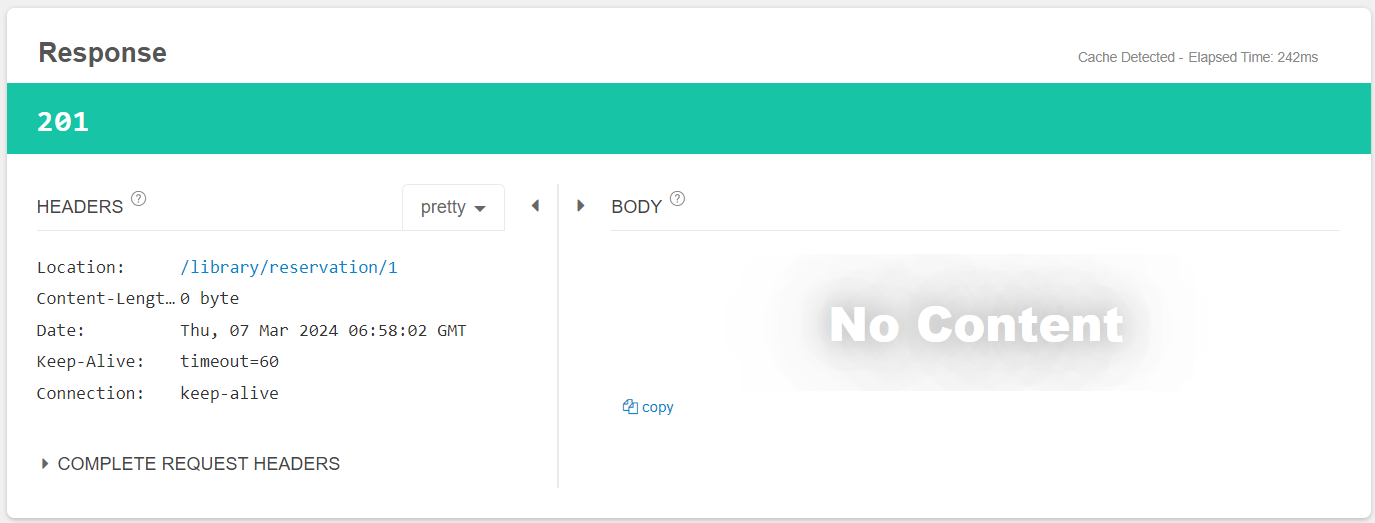
HEADER Location에 매개변수로 넣은 URI을 확인할 수 있었고 body에 넣을 값이 존재하지 않아 build()를 사용했기 BODY에는 아무 값이 나오지 않았습니다. Location에 URI를 통해 클라이언트 개발자는 생성된 새로운 자원을 확인할 수 있는 식별자를 가질 수 있습니다.
이와 같이 생성된 자원에 접근할 수 있는 URI반환을 반환하는 방법말고도 생성된 자원을 반환하는 방식도 존재합니다. 자세한 내용은 다음에 기회가 있으면 다루도록 하겠습니다.
이렇게 현재 코드들을 리팩토링하면서 많은 것을 배울 수 있는 기회였습니다. ResponseEntity Class를 살펴보면서 어떠한 클래스, 어떤 구조로 되어있는지 또 저가 몰랐던 메서드 기능들과 status 등을 공부할 수 있어서 프로젝트의 불필요한 코드들을 없앨 수 있었고 더 나은 방향으로 개선할 수 있었습니다.
또한 기존에는 인터페이스에 대해 굳이 필요한 기능인가? 라는 생각이 있었지만 이렇게 다른 사람이 작성한 코드들을 확인하면서 인터페이스를 통한 추상 메서드들을 통해 훨씬 수월하게 이해할 수 있었고 왜 설계도라고 하는 지 이해할 수 있는 기회였습니다.
여러분들도 기회 또는 시간이 되신다면 기존의 작성된 코드들을 분해해보고 어떠한 메소드들이 존재하는 지 확인해보는 시간을 가졌으면 좋겠습니다. 감사합니다.
'Spring' 카테고리의 다른 글
| 카카오 로그인에 대한 리팩토링과 고찰 (0) | 2026.01.19 |
|---|---|
| Spring Batch란? (0) | 2026.01.18 |
| Swagger UI란? (0) | 2026.01.18 |
| QueryDSL이란? (0) | 2026.01.18 |
| feign 적용기 (0) | 2026.01.18 |


